This is very useful when you want to test your outgoing email for SharePoint but not have access to an SMTP server.
- Create and setup a Gmail account to use POP3. Enabling POP3 in Gmail: http://mail.google.com/support/bin/answer.py?answer=13273&cbid=wl8yzeug2lob&src=cb&lev=topic
- Install the mail server role (POP3 and SMTP)
- Configure the IIS Server to forward messages using that account:
- IIS SMTP Virtual server -> Properties ->
- Access Tab
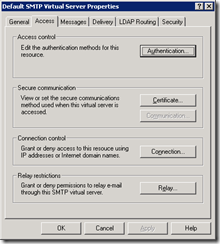
- IIS SMTP Virtual server -> Properties ->


